Modernizing Navigation
Simplifying navigation with a modern bottom nav — making the Motus app feel native and familiar.
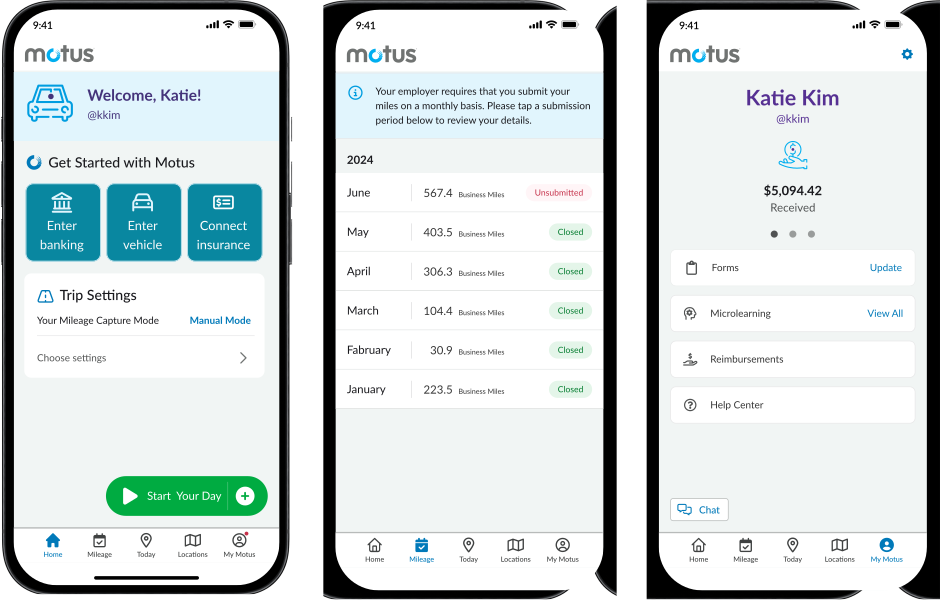
Motus is the industry leader in the vehicle reimbursement space, accountable for tracking 290M miles per month and disbursing $1.4B in reimbursement per year. The Motus app is designed to track mileage for employees who use their personal vehicles for work.
① Problem Statement & Goals
A B2B2C app its own users had outgrown
As a B2B2C product, the Motus app and its end users had long been overlooked. However, with new competitors entering the market, we began losing clients and deals. This revealed a critical issue — our app lacked the modern look, feel, and usability expected of a market leader. To address this, I led a complete redesign focused on not only refreshing the UI, but also improving the overall user experience for our 300,000 drivers.
② Research
Three pain points that reframed the scope
To gain deeper insights into the current user experience, I conducted exploratory interviews with drivers across various industries, including healthcare and construction. The goal was to understand how frequently they make personal trips during their workday and how they interact with the app when these trips occur.
Key Findings
- Lack of Awareness of Settings — Many users are unaware of the different mileage capture modes available or how to update the app settings for more accurate tracking.
- Laborious Navigation — The app's day-level model requires multiple taps to review and edit mileage logs, creating a frustrating user experience.
- Varying App Adoption — Users engage with the app at different frequencies — some only open it at the end of the month to review and submit mileage, while others may use it more regularly. This inconsistency affects overall app adoption and engagement.
③ Design Process
Architecture first, then the home screen
Information Architecture
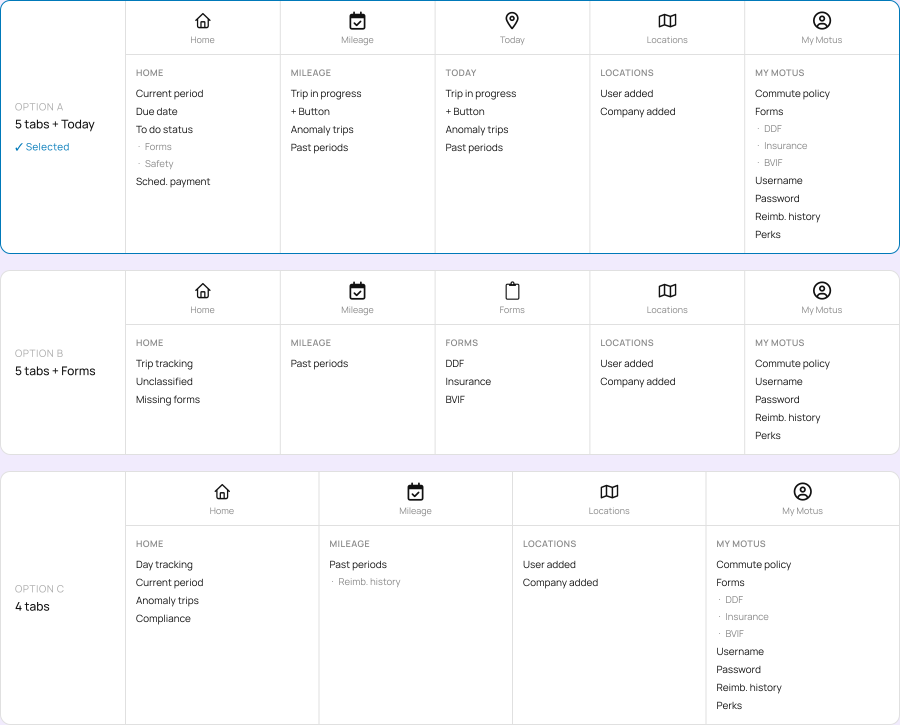
Following the research phase, I focused on defining the best categories for the new bottom navigation. My approach involved exploring various logical groupings based on the types of tasks users complete in the Motus app — ranging from daily to monthly and annual actions. After evaluating multiple options, the team ultimately chose a five-tab navigation structure. This decision allowed us to introduce a Home screen that could act as a command center, improving usability and increasing app engagement.
UI Styles
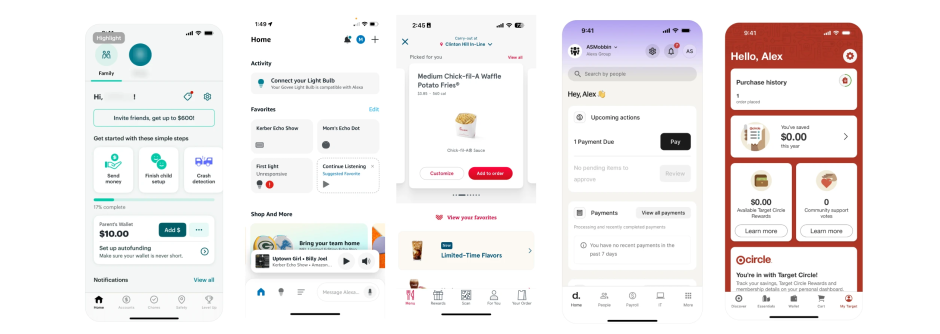
To align with industry standards and modernize the app's interface, I analyzed top apps in the market and identified common UI patterns: title placement inside vs. outside of cards for better readability, the use of shadows to create hierarchy and depth, and a balance of splash images and product icons to enhance clarity.
Home Screen Cards — Onboarding
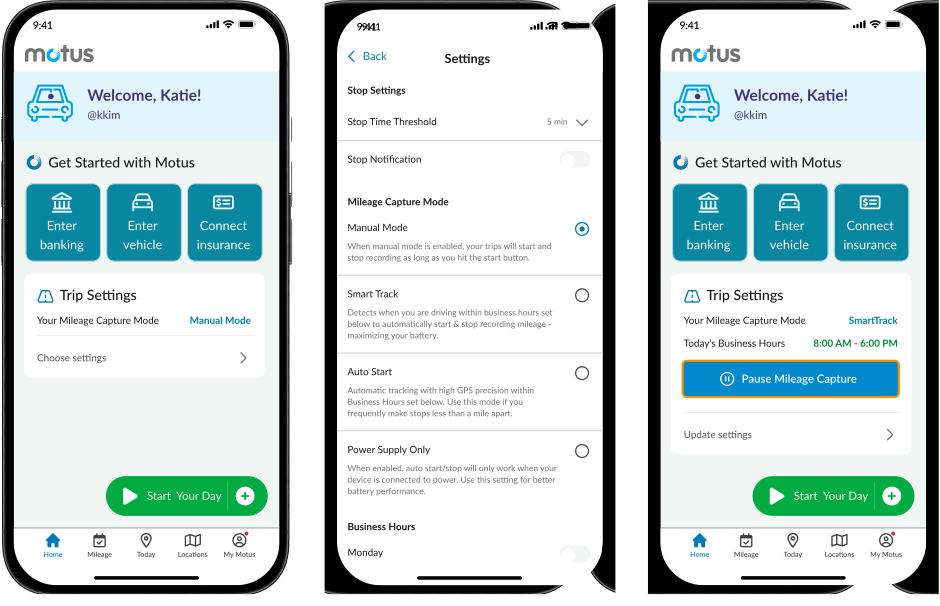
Based on user research and stakeholder feedback, I identified the most relevant and valuable categories to include on the Home screen for its initial launch.
- To Do Tasks — To improve the onboarding experience without fully redesigning the onboarding flow, I introduced task-based cards to help new users get started.
- Mileage Capture Mode — User interviews revealed a major gap: many users were unaware of the different mileage capture modes available. I designed a Trip Settings card that highlighted the default setting and encouraged users to interact with their app settings.
Home Screen Cards — Reminders Throughout the Month
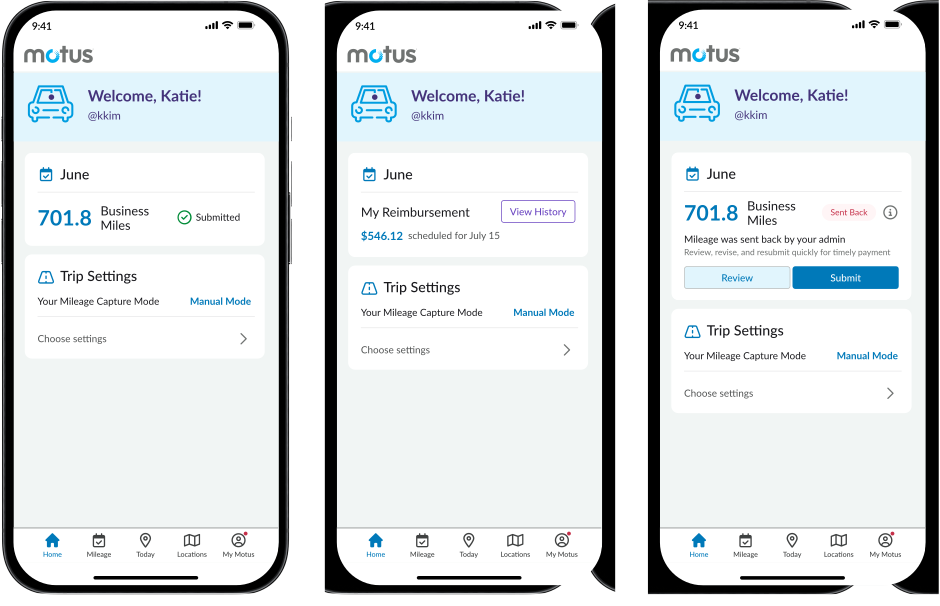
To increase app engagement and encourage users to interact with it more frequently, I designed three key reminder cards: a mileage submission confirmation showing miles successfully submitted, a reimbursement status card once the company approves, and a submission revision notification if an admin requests changes.
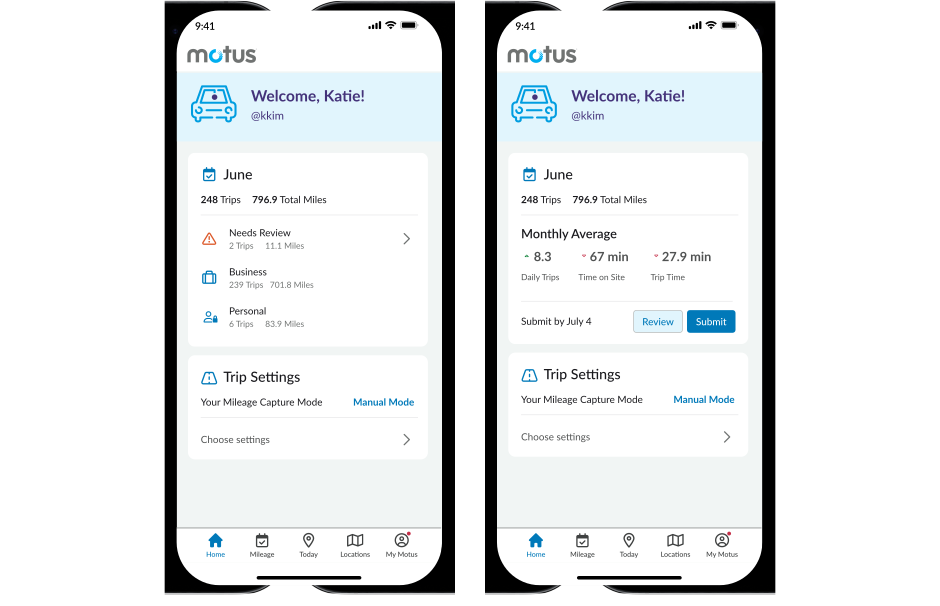
Home Screen Cards — Trip Classification Summary & Submission Reminder
To enhance user engagement and ensure timely mileage submissions, the home screen provides a visual summary chart displaying trips classified as business or personal, monthly trend insights at the end of each month, and proactive submission reminders before the monthly deadline.
Bottom Nav — Overview of Tabs
The new bottom navigation structure organizes key user actions into five intuitive categories: Home (centralized dashboard), Mileage (tracking and reviewing entries), Today (real-time daily trips), Locations (managing frequently visited places), and My Motus (settings and account management).
④ Key Results
Research that changed the roadmap
Initially, I worked on this initiative independently, preparing for improvements in the second half of 2025. However, through user interviews and ongoing communication with leadership, it became evident that the app had critical usability gaps that needed to be addressed.
As a result of these user pain points surfacing during research, leadership decided to reprioritize this initiative over a previously planned growth initiative. My research and prototypes demonstrated:
- Improved app navigation — introducing a home screen would create a more intuitive user experience
- Modernized app layout — a more structured layout would allow Motus to seamlessly introduce new features and drive adoption
- Addressed usability concerns — by addressing user pain points, Motus would improve user satisfaction and help retain clients in an increasingly competitive market
By advocating for these changes through research, I was able to influence strategic priorities and align design improvements with business objectives.